
Tired of buffering videos, slow downloads, and sluggish gaming? You're not the only one. In the busy online world that we live in, where data usage demands continue to grow from streaming in 4K and online calls to online work and smart appliances, a fast, reliable connection is essential.
If your plan is simply not meeting your needs, it could well be time to upgrade NBN plan Australia for faster speeds and faster Internet that more accurately meets your lifestyle. It's about more than higher speeds; it's about lag-free multitasking, rock-strong connections, and being able to do more online with less aggravation.
So, if booting lag to the curb and enjoying a faster, smoother, and more consistent connection is your jam, we've got you covered.
Here’s a quick summary: This blog is your go-to resource for how to upgrade NBN plan Australia. Whether you want higher speeds, improved data usage, or faster Internet, you’ll learn how to pick the right plan, what tech or provider factors matter, and how to unlock the full potential of your home connection!
Why You Need Faster Speed? Want to Upgrade NBN Plan Australia?
Internet availability has shifted substantially. Due to 4K devices and working/studying from home, you now need a higher National Broadband Network connection, rather than base plans that were sufficient for emails and casual surfing in the past.
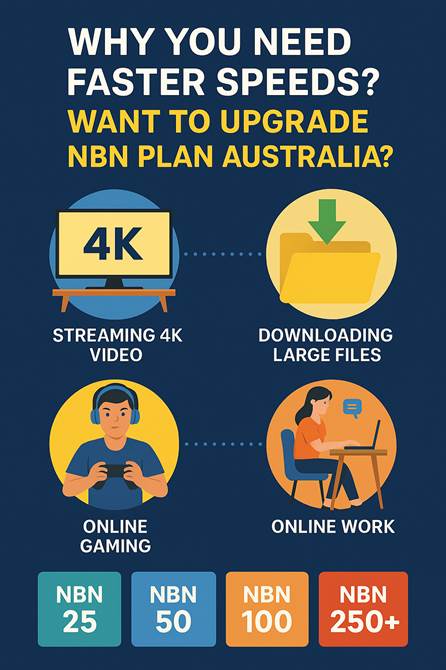
Understand Data Consumption and Bandwidth Needs
Broadband usage defines speed requirements. Think about your home's data usage. As of mid-2025, the typical NBN service downloads around 550–600 GB of data per month, reflecting a steady increase driven by 4K streaming, gaming, and remote work.
This is a short guide to the best use of all National Broadband Network speeds:
- NBN 25 (Home Basic II): Offers 25 Mbps, ideal for small families for basic surfing, social, and casual definition streaming for a few people (1-2 persons).
- NBN 50 (Home Standard): Ideal for the majority of Australian families, it allows for 50 Mbps of downloads, suitable for streaming in HD, online gaming, and a home office for 2-4 individuals.
- NBN 100 (Home Fast): Ideal for large families, up to 100 Mbps of downloading speeds, best for streaming in 4K, online gaming, and bulk file transfers.
- NBN 250 (Home Superfast) and NBN 1000 (Home Ultrafast): NBN 1000 (Home Ultrafast): Ideal for technophile homes and small businesses, offering real-world speeds of ~800–900 Mbps on FTTP or HFC connections. Best for heavy-capacity applications like 8K streaming and rapid cloud backups.
You must select the correct speed tier for a faster internet. Consider reviewing a side-by-side plan comparison before making your decision.
What Determines the Network Speeds When You Upgrade NBN Plan Australia
Even prior to upgrading, make sure that you know what affects your connection. The Australian broadband network is not solely dependent on your plan but also depends on your home Wi-Fi system and the technology at your address.
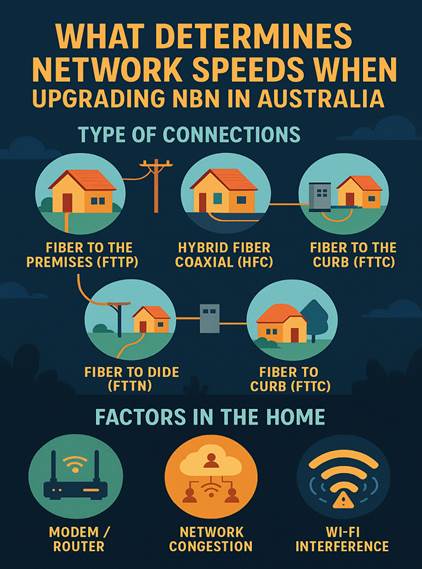
Type of Connections
All NBN connections are not created equal. The technology that brings your web speed to you is all that differs from your pace.
- Fiber to the Premises (FTTP): The ultimate end-to-end fiber optic cable all the way to your premises for the best in fast and higher speeds, including National Broadband Network 1000.
- Hybrid Fiber Coaxial (HFC): It utilizes the cable TV infrastructure and provides speeds similar to FTTP.
- Fiber to the Node (FTTN): Fiber is carried to a street node, then by copper lines to your house. Speed decreases with distance from the node.
- Fiber to the Curb (FTTC): Fiber is taken near your premises to a street pit, then a short section of copper. It is typically faster than FTTN.
Your address technology matters. If you're in FTTN/FTTC copper, it's possible a plan change isn't going to make that big of a difference. Quite a few Australians can access a no-cost FTTP upgrade.
Factors in the Home Influencing Your Speed
Even with a great plan, in-home installation is essential.
- Your Modem/Router: An aged or lower-spec router may stall when it deals with higher speeds. For NBN 250 or 1000 plans, consider a Wi-Fi 6E router or mesh system to maximize performance and minimize interference.
- Network Congestion: Slow speeds when everyone is online in peak data usage hours (7 pm to 11 pm). An RSP acquires ample capacity to handle demands.
- Wi-Fi Interference: Appliances, walls, and distance all diminish your signal strength. Store your router in a central, higher location. In larger homes, a mesh system can reduce dead spots.
How to Change Your Plan in Australia?
Ready to escape from laggy speeds? Boost your upgrade NBN plan Australia for improved performance.
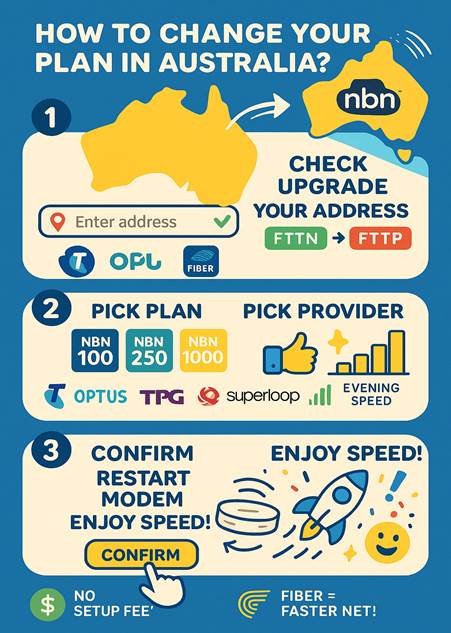
Step 1: Check Eligibility
Compare online with Telstra or AGL to find out if your address qualifies for a no-cost fiber upgrade from FTTN or FTTC to FTTP. You'll typically need an NBN 100, 250, or 1000 plan.
Step 2: Select a New Plan and Carrier
After verifying eligibility, choose a new plan and provider (Telstra, Optus, TPG, Superloop, Aussie Broadband available). Choose their evening averages from ACCC reports and compare.
Step 3: Process of Upgrading and Installing
Changing from a low-speed plan to a higher-speed plan on in-service technology (e.g., from National Broadband Network 50 to 100 on FTTC) is typically a basic online or telephone procedure that necessitates a modem restart.
Upgrading to fiber is more significant, as new gear is placed indoors and outside your residence by an NBN Co technician, who will take several hours and must bring an adult with them. Renters also require their landlord's consent.
| NBN Speed Tier | Typical Evening Download Speed (Mbps) | Suitable For |
| NBN 25 | ~25 Mbps | 1–2 users, SD streaming |
| NBN 50 | ~50 Mbps | 2–4 users, HD streaming, online gaming |
| NBN 100 | ~90–95 Mbps | 4+ users, 4K streaming, remote work |
| NBN 250 | ~220–240 Mbps | Tech-savvy users, multiple 4K streams |
| NBN 1000 | ~800–900 Mbps | Heavy data users, large families, and professional use |
FAQs for Australian Users: How to Get Faster Speeds
1. How do I choose the appropriate network speed for me?
Select your plan based on household size and activity. For 1–2 users that primarily browse or stream SD, a 25 Mbps plan is a good choice. Choose 50 Mbps for 3–4 users who stream HD or play games. 100 Mbps or more is ideal for large families or 4K streamers.
2. Can I alter my network speed plan whenever I want?
Yes, most Australian providers allow you to upgrade or downgrade at any time. Simply call your provider — some plans will have contract terms or minor change fees.
3. Do I need a new router or modem when upgrading?
Generally, not. Your present modem will deal with minor upgrades (such as 50 Mbps to 100 Mbps). If you have higher-speed plans like 250 Mbps or 1000 Mbps, you might need a high-speed modem or router — your provider can tell you what's compatible.
Expert Take: “With remote work, 4K streaming, and smart devices driving demand, Australian households now average 550–600 GB of data use per month. Upgrading your NBN plan ensures a seamless online experience.” — Adapted from NBN Co insights, 2025.
In a Nutshell
Updating your plan is an easy fix for faster speed and a better online life in Australia. Understanding your data usage, checking your connection technology, and choosing the right plan and provider ensure your internet is fast enough to keep pace with your online life.
With more Australians eligible for fibre upgrades, now is the time to take control of your Internet speed and switch to a faster, more reliable connection.
